Dedicated vCPU vs Shared vCPU: Performance, Cost, and When to Use Each
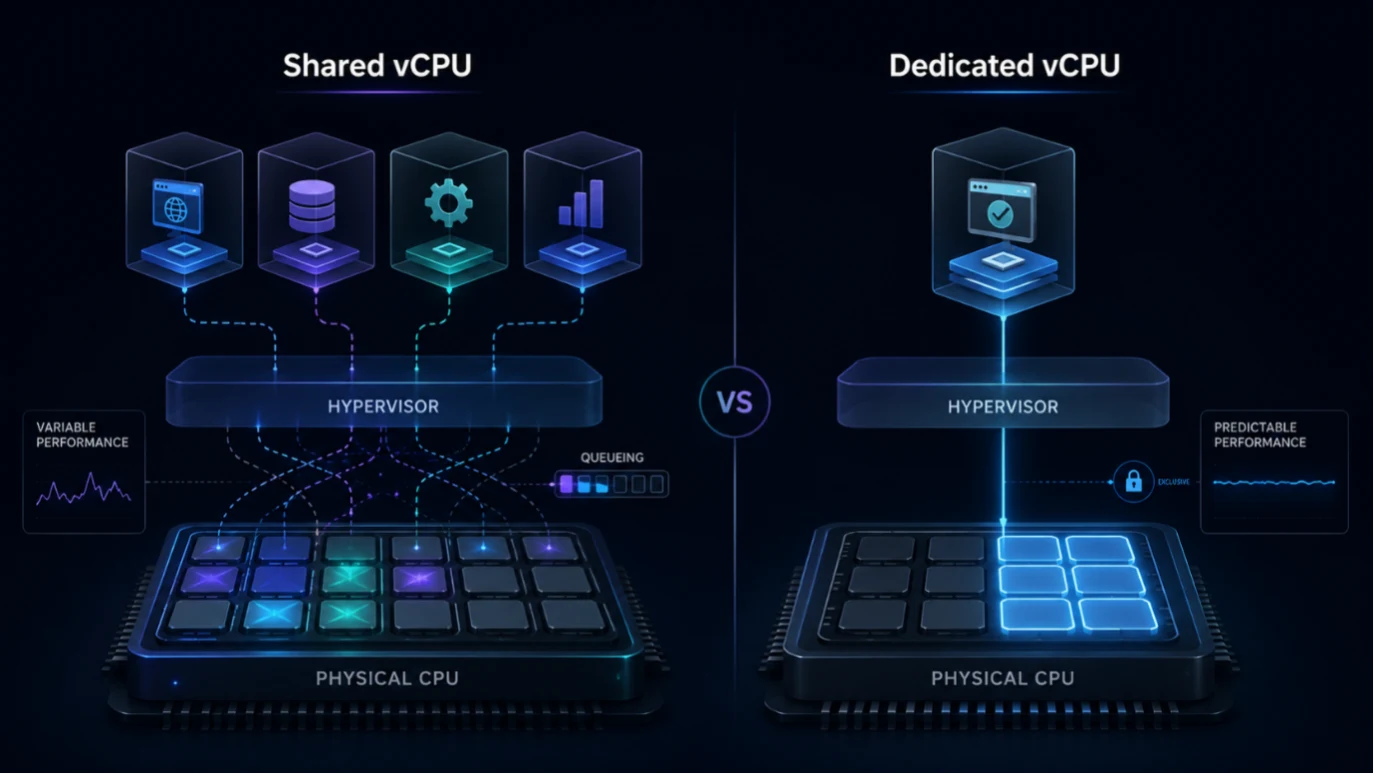
Choosing between a dedicated vCPU and a shared vCPU is not simply a question of which option is faster. The real decision is whether your workload benefits enough from predictable CPU access to justify the additional cost.
Shared vCPUs are cost-efficient for workloads with light, intermittent, or bursty CPU demand. Dedicated vCPUs reserve CPU capacity for a virtual machine, reducing cross-tenant contention and making sustained performance more predictable.
For developers, DevOps teams, and infrastructure managers, the right choice depends on workload behaviour, latency requirements, performance consistency, and budget.
This guide explains dedicated vCPU vs shared vCPU infrastructure from the hypervisor level through real-world workload selection, including CPU contention, noisy neighbours, steal time, cost, and the point at which dedicated CPU becomes worth paying for.
What Is a vCPU? Shared vs Dedicated CPU Allocation
Choosing the right compute resource starts with understanding what a vCPU actually is.
A vCPU is a virtual processor exposed to a virtual machine by a hypervisor, the software layer responsible for abstracting physical hardware and scheduling virtual processors onto available CPU resources.
A vCPU should not be treated as a universal fixed fraction of one physical core. The relationship between vCPUs, physical cores, and hardware threads varies by provider, processor architecture, hypervisor, and resource-allocation model.
The important distinction for users is whether CPU capacity is shared with other virtual machines or reserved for a specific workload.
Shared CPU allocation
Multiple VMs can draw from the same physical CPU resources. This allows providers to use infrastructure efficiently and can involve oversubscription, where the total virtual CPU capacity provisioned is greater than the physical CPU capacity available simultaneously.
Dedicated CPU allocation
Dedicated vCPU offerings reserve CPU capacity for the VM, reducing contention from other tenants and providing more predictable sustained performance. Exact CPU-to-vCPU mapping, hardware-thread allocation, and techniques such as CPU pinning remain provider-specific.
A few terms are useful when comparing the two:
- vCPU: A virtual processor presented to a VM and scheduled onto physical CPU resources.
- Hypervisor: The virtualisation layer responsible for running VMs and scheduling their access to physical hardware.
- Oversubscription: Allocating more virtual CPU capacity than the host could provide simultaneously if every VM demanded its full allocation.
- CPU pinning: A virtualisation technique that can bind virtual CPUs to particular physical CPU resources. Whether and how it is implemented depends on the provider.
Understanding these concepts explains why two virtual machines advertising the same number of vCPUs may behave differently under sustained load.
Dedicated vCPU vs Shared vCPU: Key Differences
In practical terms, the dedicated CPU vs shared CPU comparison is about reserved compute capacity versus CPU resources scheduled across multiple virtual machines.
Neither option is universally superior.
Shared CPU infrastructure improves resource efficiency and lowers the cost of workloads that do not continuously require processor capacity. Dedicated CPU prioritises consistency by reserving compute capacity for the VM.
| Attribute | Shared vCPU | Dedicated vCPU |
|---|---|---|
| CPU access | Physical CPU capacity may be shared across multiple VMs | CPU capacity is reserved for the VM |
| Performance consistency | Can vary when host resources are contended | More predictable under sustained load |
| Resource contention | Possible when several VMs require CPU simultaneously | Cross-tenant CPU contention is significantly reduced |
| Burst behaviour | Well suited to intermittent CPU demand | Designed for predictable sustained CPU access |
| Relative cost | Usually lower | Usually higher |
| Typical use cases | Development, staging, small websites, lightweight services | Databases, CI/CD, latency-sensitive APIs, sustained compute |
Dedicated vCPU does not automatically mean a higher clock speed or better application performance in every situation.
A lightly loaded application can perform perfectly well on shared CPU resources because it rarely requires sustained processor access. The benefit of dedicated CPU becomes clearer when a workload continuously consumes compute capacity or is sensitive to latency variation.
If you are comparing VPS options across European providers, pay close attention to how each provider defines shared, dedicated, reserved, or performance CPU. The terminology is not standardised across the industry.
Shared vCPUs can be a strong fit for lightweight or irregular workloads, while dedicated CPU becomes more valuable as sustained demand and performance-consistency requirements increase.
The correct question is therefore not “Which CPU model is better?”
It is “Which CPU model better matches the behaviour of this workload?”
Noisy Neighbours, CPU Contention and Steal Time
The main performance risk in a shared CPU environment is CPU contention.
Multiple virtual machines can operate on the same physical host. When several workloads require CPU capacity at the same time, the hypervisor must schedule which virtual CPUs execute and when.
A neighbouring VM consuming significant CPU resources can therefore influence the amount of processor time available to other shared workloads. This is commonly known as the noisy-neighbour effect.
The impact varies substantially depending on provider architecture, host utilisation, scheduling policies, oversubscription, and workload patterns.
One metric that can help diagnose contention in some virtualised environments is CPU steal time.
In Linux/KVM environments, steal time represents time during which a virtual CPU was ready to execute but did not receive physical CPU execution time because the hypervisor was servicing other workloads. The KVM documentation exposes this behaviour through virtual-machine accounting mechanisms. Learn more in the Linux KVM documentation.
Steal time is useful, but it is not the complete picture.
There is no universal steal-time percentage that defines whether an application has a performance problem. A value that is irrelevant to one background workload could materially affect a latency-sensitive service.
Evaluate it together with:
- Application latency — are response times becoming inconsistent?
- CPU utilisation — is CPU demand sustained or only occasional?
- Throughput — does request-processing capacity drop under load?
- Concurrency — does performance degrade as simultaneous demand grows?
- Database or application metrics — are query times, queues, or job durations changing?
Diagnostic tip: Monitor steal time through tools such as vmstat or top over a meaningful period rather than relying on a single peak measurement.
The goal is not to eliminate every sign of virtualisation overhead. It is to determine whether infrastructure contention is materially affecting the workload.
For teams comparing shared vCPU vs dedicated for production workloads, this distinction matters more than the label attached to the server plan.
Which Workloads Fit Shared vCPU?
Shared vCPU is not inherently an inferior infrastructure choice.
For many workloads, continuously reserving CPU capacity would provide little measurable benefit because the application spends much of its time idle or waiting on network, storage, databases, or user activity.
Shared vCPU tends to work well for:
- Development and test environments — workloads are often intermittent and performance consistency is rarely business-critical.
- Staging servers — traffic is generally lower than production and CPU pressure may be limited.
- Low-traffic websites and blogs — requests are brief and long idle periods are common.
- Small or internal APIs — many spend substantial time waiting on I/O rather than continuously consuming CPU.
- Lightweight background services — scheduled jobs, utility servers, queue consumers, and log-processing services with modest throughput.
- Bursty or intermittent workloads — services that occasionally require CPU but quickly return to low utilisation.
Production use does not automatically disqualify shared CPU.
As Zenlayer’s documentation explains, the practical distinction is whether processor capacity is shared or reserved.
A low-traffic production website or lightweight internal service may run effectively on shared infrastructure for years if its CPU requirements remain modest.
The key question is whether the application can tolerate some variation in available CPU capacity.
If sustained CPU demand is low and short-lived performance variation does not affect users or service objectives, shared vCPU can provide a very efficient cost-to-performance balance.
Shared vCPU is not a compromise when it correctly matches the workload.
Which Workloads Benefit from Dedicated vCPU?
Dedicated vCPU becomes more valuable as sustained CPU demand, latency sensitivity, concurrency, or workload criticality increases.
Typical candidates include:
- Sustained compute tasks — video encoding, image processing, analytics, and other jobs operating at high utilisation for extended periods.
- Latency-sensitive APIs — services where response-time consistency directly affects users or downstream systems.
- Databases with consistent CPU demand — PostgreSQL, MySQL, and similar engines processing concurrent queries.
- CI/CD runners — build and test pipelines where unpredictable execution times reduce developer productivity.
- Game servers — workloads where timing consistency can directly affect player experience.
- Performance-sensitive production services — applications where unpredictable throughput or latency can affect service commitments.
Dedicated CPU does not guarantee application performance by itself.
Storage latency, memory pressure, networking, application architecture, database design, and software efficiency remain equally important.
What dedicated vCPU primarily provides is more predictable CPU availability.
That makes it particularly useful when consistent throughput matters more than occasional bursts of compute capacity. Raff Technologies’ comparison similarly focuses on workload consistency as a central distinction between the models.
It is equally important not to assume that every production workload requires this degree of resource isolation.
Lightly trafficked APIs, internal applications, staging environments, and background workers may perform adequately on shared infrastructure.
Match CPU allocation to the workload’s tolerance for performance variation, not to a blanket assumption that production always requires dedicated CPU.
Cost vs Performance: When Is Dedicated CPU Worth It?
Price alone does not tell the full story.
Shared vCPU instances usually have a lower entry cost because providers can use physical CPU capacity efficiently across multiple customers.
Dedicated CPU costs more because processor capacity is reserved rather than dynamically shared.
The obvious strategy is to begin with shared CPU and move to dedicated resources only when required. For many workloads, that approach is entirely reasonable.
However, infrastructure cost needs to be considered against the complete workload.
If a team continually compensates for inconsistent CPU performance by moving to larger shared instances, the apparent saving can disappear. Paying for additional vCPUs, RAM, or oversized machines purely to absorb performance variation may eventually cost more than using a smaller configuration with predictable CPU capacity.
The reverse is also true.
A development server that spends most of the day idle gains little from dedicated CPU. The additional cost simply reserves capacity that remains unused.
| Option | Typical Cost Position | Performance Predictability | Best Suited To |
|---|---|---|---|
| Shared vCPU | Lower baseline cost | Can vary with host contention | Lightly utilised apps, staging environments, bursty workloads with higher tolerance for latency variation |
| Dedicated vCPU | Higher baseline cost | More predictable sustained CPU access | Sustained compute, latency-sensitive APIs, databases, CI/CD and performance-sensitive services |
The question is therefore not simply:
Which VM has the lowest advertised price?
It is:
Which configuration delivers the required application performance at the lowest total infrastructure cost?
If you want to compare the actual cost of different NexNodo configurations, the current NexNodo pricing page lists CPU, RAM, storage, transfer, hourly pricing, and estimated monthly cost together.
Always evaluate total workload requirements, not the headline VM price alone.
How to Choose the Right VPS Configuration
Selecting the right VPS configuration should begin with measurements from the application rather than assumptions about shared or dedicated infrastructure.
Evaluate the following factors.
Average CPU utilisation
Look at CPU behaviour over meaningful periods rather than isolated peaks. If utilisation remains high for sustained periods instead of brief bursts, reserved CPU capacity becomes more valuable.
Sustained vs burst demand
A service that performs intensive work for a few seconds and then remains idle behaves very differently from an application processing continuously throughout the day.
Latency sensitivity
Consider whether performance variation is merely measurable or actually harmful.
Background workers may tolerate short delays. Interactive APIs, transaction-processing systems, and real-time services may not.
Concurrency
Higher numbers of simultaneous requests can expose processor contention more clearly, particularly when individual requests already require meaningful CPU time.
Workload criticality
A development server and a revenue-generating API can justify very different infrastructure costs even if their average CPU utilisation looks similar.
Expected growth
Plan for realistic growth, but avoid paying today for hypothetical capacity that may never be required.
Budget
Shared infrastructure is often an efficient starting point when controlling spend matters more than performance consistency.
Provider transparency
Review exactly what the provider means by terms such as shared, dedicated, performance, reserved, or compute-optimised vCPU. Implementations differ, so the marketing label alone is not enough.
A practical rule is:
Choose shared vCPU when CPU demand is light or intermittent and performance variation is acceptable. Choose dedicated vCPU when sustained compute, latency consistency, or predictable throughput materially affects the application.
NexNodo’s currently published VPS configurations use dedicated vCPU resources, with clearly listed CPU, RAM, SSD, and transfer allocations. That makes them particularly relevant for workloads where predictable compute capacity is an important selection criterion.
You can compare available configurations on the NexNodo VPS page or review full infrastructure pricing on the pricing page.
Match your infrastructure choice to how the workload behaves today, then revisit the decision as traffic and performance requirements evolve.
Frequently Asked Questions
What is the difference between a shared vCPU and a dedicated vCPU?
A shared vCPU uses physical CPU capacity that may also serve other virtual machines, so available processor time can vary with overall host utilisation.
A dedicated vCPU reserves CPU capacity for the VM, reducing cross-tenant contention and providing more predictable performance during sustained CPU demand.
The exact technical implementation varies by provider.
Is dedicated vCPU always faster?
Not necessarily.
For lightly utilised or intermittent workloads, a shared vCPU may provide all the performance the application needs.
The main advantage of dedicated vCPU is not necessarily higher peak speed. It is more predictable access to CPU capacity when a workload requires sustained processing.
Can shared vCPU be used for production?
Yes.
Many production websites, APIs, dashboards, and lightweight services can run effectively on shared vCPU infrastructure when sustained CPU demand is low and some performance variation is acceptable.
Production workloads with strict latency, throughput, or consistency requirements are more likely to benefit from dedicated CPU capacity.
What is CPU steal time?
CPU steal time represents time during which a virtual CPU was ready to execute but did not receive physical CPU execution time from the hypervisor.
Sustained or increasing steal time can indicate CPU contention in some virtualised environments, but it should be evaluated together with application latency, CPU utilisation, throughput, and other workload metrics rather than treated as a standalone threshold.
When should I upgrade from shared to dedicated CPU?
Consider dedicated CPU when monitoring shows sustained compute demand or when inconsistent CPU availability is affecting response times, throughput, database queries, CI/CD duration, or other application-level metrics.
An upgrade is particularly worth evaluating when adding more shared resources is being used mainly to compensate for unpredictable CPU performance.
The clearest signal is not simply that an application is slow. It is that the workload requires more predictable CPU availability than the shared environment can consistently provide.