VPS vs Cloud Hosting: What’s the Difference and Which Should You Choose?
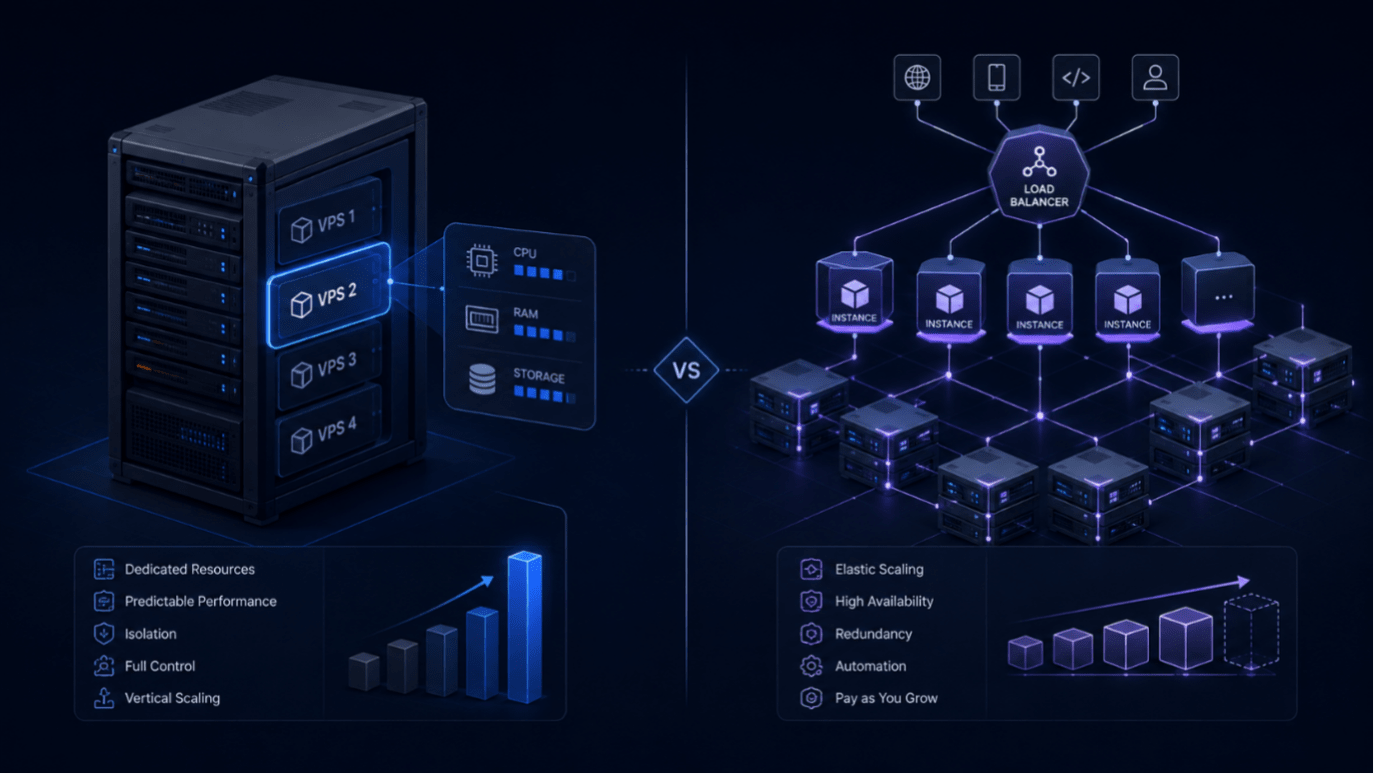
Choosing between VPS and cloud hosting is less about finding a universally “better” option and more about matching infrastructure to the workload.
VPS hosting typically emphasizes defined resources, direct server control, and predictable infrastructure requirements. Cloud platforms add broader orchestration, automation, elasticity, and distributed-service capabilities.
Both approaches can run production workloads effectively. The right choice depends on how your application behaves, how quickly demand changes, how much infrastructure complexity your team wants to manage, and how you prefer to pay for compute resources.
In this guide, we compare VPS vs cloud hosting across architecture, performance, scalability, reliability, pricing, and management overhead so you can determine which model makes the most sense for your application.
VPS vs Cloud Hosting at a Glance
The biggest difference between VPS hosting and cloud hosting is not simply where the server runs. Both models can use virtualization and both can provide isolated virtual machines.
The difference is primarily in the infrastructure and orchestration layer around those virtual machines.
A VPS typically provides a defined set of virtual compute resources on a host. Cloud platforms usually add a broader management layer for provisioning, networking, storage, automation, availability features, and scaling across a larger infrastructure pool.
| Factor | VPS Hosting | Cloud-Oriented Infrastructure |
|---|---|---|
| Resource model | Defined virtual resources | Flexible VM and service configurations |
| Scaling | Commonly vertical; horizontal scaling is possible | Strong tooling for horizontal scaling |
| Pricing | Often easier to forecast | Can vary with usage and services |
| Control | High OS-level control | High control plus broader platform services |
| Complexity | Usually simpler | Can involve more networking, IAM and automation |
| Best fit | Stable, predictable workloads | Variable, distributed or rapidly changing workloads |
That distinction becomes more important as applications grow.
The Architecture of VPS and Cloud Hosting
Both VPS and cloud hosting can use a hypervisor to divide physical compute infrastructure into isolated virtual machines.
With a VPS, a provider allocates a defined amount of CPU, RAM, storage, and networking capacity to an individual virtual machine. The user operates that environment much like a standalone server, typically with full operating-system-level control.
Cloud infrastructure builds additional orchestration around the virtual machine layer.
Depending on the platform, that can include automated provisioning, software-defined networking, load balancing, distributed storage, managed databases, monitoring, autoscaling, and deployment across multiple infrastructure locations.
This distinction matters because the term cloud server can describe very different products. A single virtual machine running on a cloud platform can still behave similarly to a VPS from the application’s perspective.
Cloud does not automatically mean that one application is running simultaneously across many physical servers. High availability and multi-node deployment usually require additional architecture and configuration.
The practical difference is therefore less about “one server versus many servers” and more about the level of infrastructure abstraction and automation available around the workload.
Performance Consistency vs Elasticity
Performance requirements are often where the VPS vs cloud decision becomes more practical.
A VPS can work particularly well for stable workloads where resource requirements are understood in advance. When CPU, memory, and storage requirements remain relatively consistent, teams can select an appropriately sized instance and operate it without constantly adjusting infrastructure.
Typical examples include:
- business websites
- APIs
- development environments
- internal applications
- smaller SaaS workloads
- databases with predictable demand
- application servers
Cloud-oriented infrastructure becomes more attractive when workload demand changes quickly.
For example, an application experiencing seasonal traffic spikes may benefit from multiple instances behind a load balancer rather than continuously running a larger server sized for peak traffic.
The important point is that neither model guarantees better performance by definition.
Actual performance depends on factors such as CPU allocation, storage technology, networking, virtualization overhead, provider architecture, workload design, and how heavily the infrastructure is utilized.
Monitoring is therefore essential in both environments. CPU saturation, memory pressure, disk I/O, network latency, and application response times provide a much better basis for infrastructure decisions than the VPS or cloud label alone.
Scalability: Vertical Growth vs Horizontal Scaling
VPS environments commonly scale vertically.
For teams comparing cloud VPS vs cloud server options, the practical difference is often less about virtualization itself and more about the orchestration, scaling, and managed infrastructure capabilities available around the instance.
If an application needs more resources, the team upgrades the virtual machine with additional CPU, RAM, or storage. Depending on the provider and resource type, this may require a restart.
Vertical scaling is simple and works well when growth is gradual and predictable.
A SaaS application, for example, may operate efficiently on a VPS for years by periodically moving to larger configurations.
Cloud platforms typically provide stronger tooling for horizontal scaling.
Instead of making one machine increasingly powerful, teams can deploy several application instances behind a load balancer. When autoscaling policies and supporting infrastructure are configured, capacity can increase or decrease in response to demand.
Signs that horizontal scaling may become useful include:
- traffic becoming highly unpredictable
- a single application instance becoming a performance bottleneck
- availability requirements exceeding what one VM can provide
- growing numbers of independent application services
- engineering teams spending too much time managing capacity manually
However, horizontal scaling is not automatically better.
It introduces additional complexity around application state, networking, databases, observability, deployments, and failure handling.
For many smaller and mid-sized workloads, vertical scaling remains the simpler operational choice.
Reliability and Redundancy: What Actually Determines Availability
A common assumption is that VPS hosting has a single point of failure while cloud hosting automatically provides high availability.
The reality is more nuanced.
A single virtual machine — whether marketed as a VPS or a cloud instance — can still represent a single point of failure.
If the underlying host, storage layer, operating system, or application fails, the workload may become unavailable.
Cloud platforms often provide infrastructure features that make resilient architectures easier to build. These can include availability zones, replicated storage, load balancers, machine groups, automated replacement of unhealthy instances, and multi-region deployment options.
But those capabilities generally need to be configured and incorporated into the application architecture.
High availability typically involves some combination of:
- multiple application instances
- load balancing
- replicated databases
- redundant storage
- health checks
- automated instance replacement
- deployment across separate failure domains or locations
Backups remain essential regardless of platform.
Infrastructure redundancy can protect against certain hardware failures, but it does not protect against accidental deletion, corrupted data, application bugs, compromised credentials, or configuration mistakes.
For critical workloads, independent and regularly tested backups should be part of the architecture whether the application runs on a VPS or a cloud platform.
Pricing: Predictability vs Pay-As-You-Go Flexibility
Pricing is another area where VPS hosting vs cloud hosting can differ significantly.
VPS pricing is often easier to forecast because the compute configuration is defined in advance. Billing models vary by provider: some charge a fixed monthly price, while others track infrastructure consumption hourly and provide an estimated monthly cost for continuously running resources.
That makes it relatively straightforward to understand what a specific CPU, RAM, and storage configuration is likely to cost.
Cloud platforms often introduce more pricing dimensions.
Depending on the provider and architecture, the total bill may include:
- compute
- block or object storage
- snapshots
- outbound data transfer
- public IP addresses
- load balancing
- managed databases
- monitoring
- API requests
- additional managed services
This does not mean cloud infrastructure is necessarily more expensive.
For short-lived workloads, testing environments, batch processing, or applications that can scale down significantly during quiet periods, usage-based cloud pricing can be highly efficient.
The important point is to compare the complete workload cost, rather than looking only at the advertised price of a virtual machine.
Teams should model compute, storage, networking, backups, managed services, and expected utilization before choosing either model.
Management Overhead: Control vs Convenience
Infrastructure choice also affects how much operational work your team needs to perform.
A VPS typically follows a server-centric management model.
Developers or administrators manage the operating system, installed packages, application runtime, security configuration, monitoring, patches, and backups unless those responsibilities are included in a managed service.
Cloud virtual machines can provide similar OS-level control, but cloud platforms often add additional infrastructure layers.
Teams may also need to manage:
- Identity and Access Management policies
- Virtual Private Clouds
- subnets
- security groups or firewall rules
- load balancers
- object and block storage
- autoscaling policies
- managed services
- infrastructure automation
These tools provide significant flexibility, but they also increase operational complexity.
For teams without dedicated DevOps or platform engineering resources, simpler infrastructure can sometimes be an advantage.
Application marketplaces and preconfigured deployment templates can reduce this management overhead in both VPS and cloud environments by allowing common software stacks to be deployed much faster.
The right level of abstraction depends on whether your team values direct control, infrastructure automation, or a balance between the two.
Which Should You Choose?
There is no universal winner in the VPS vs cloud hosting comparison.
Choose a VPS when you prioritize:
- predictable resource allocation
- straightforward infrastructure requirements
- direct server control
- stable workloads
- simpler operations
- easy-to-understand pricing
Cloud-oriented infrastructure may be a better fit when you prioritize:
- elasticity
- horizontal scaling
- infrastructure automation
- distributed workloads
- advanced managed services
- multi-instance or multi-location architectures
In many cases, the answer is not one or the other.
A company may run a website or database on VPS infrastructure, use Kubernetes for containerized services, and consume GPU resources only when machine learning workloads require them.
Infrastructure should follow the workload rather than forcing every workload into the same model.
How NexNodo Fits Into This Decision
NexNodo takes a different approach from a traditional single-provider cloud.
Through one infrastructure marketplace, developers can access VPS, Managed Kubernetes, GPU, storage, and application deployment resources from a unified platform.
That allows teams to select infrastructure based on workload requirements rather than building every application around a single infrastructure model.
A stable application may be well suited to a VPS. A containerized service may benefit from Kubernetes. GPU-intensive workloads can use dedicated accelerator resources when required.
The goal is not to make every workload look the same, but to make the infrastructure options easier to access and manage from one place.
Before choosing a deployment model, review your current workload and document:
- baseline CPU and memory usage
- expected traffic patterns
- storage requirements
- availability targets
- scaling requirements
- backup strategy
- data residency requirements
- available DevOps resources
- expected monthly infrastructure budget
Those answers will usually make the VPS vs cloud decision much clearer.
Frequently Asked Questions
Is VPS better than cloud hosting?
Not universally. VPS hosting is often a strong fit for predictable workloads, direct server control, and simpler infrastructure requirements. Cloud-oriented infrastructure can be a better fit when elasticity, automation, distributed architecture, and horizontal scaling are more important.
Is a VPS the same as a virtual machine?
A VPS is a type of virtual machine environment. The term VPS usually describes how virtualized resources are packaged and offered as a server product, while virtual machines are also a fundamental building block of many cloud platforms.
What are the disadvantages of VPS hosting?
A single VPS has finite vertical scaling capacity and may require additional infrastructure for high availability, redundancy, and horizontal scaling. Teams are also typically responsible for operating-system and application management unless they use a managed service.
Can a VPS scale horizontally?
Yes. Applications running on VPS infrastructure can be deployed across multiple VPS instances and placed behind a load balancer. Cloud platforms typically make this type of orchestration and automated scaling easier to configure and operate.