KVM VPS in Europe: Shared vs Dedicated vCPU Explained
A KVM VPS is a virtual machine built using Kernel-based Virtual Machine technology. KVM tells you how the server is virtualized. It does not tell you whether its CPU is shared or dedicated, how fast the storage is, or how the provider bills for it.
That distinction matters when comparing KVM VPS hosting in Europe. Two plans advertising 4 vCPUs and 8 GB RAM may behave differently under the same application load.
This guide explains the resource differences, how to test them and what to check before ordering. It is published by NexNodo, which offers access to VPS infrastructure through independent providers.
What is a KVM VPS?
KVM is a virtualization technology in the Linux kernel. With the surrounding virtualization software, it enables a physical host to run virtual machines with their own guest operating systems and virtual hardware. The KVM project describes support for multiple guests, including Linux and Windows.
In a typical self-managed VPS product, you administer the guest operating system while the provider operates the underlying host. The available images, custom-image support and administrative access depend on the product.
The VM boundary separates guest operating systems, but it does not make the service immune to vulnerabilities, host failures or resource contention. Updates, access controls and backups remain necessary.
KVM does not mean dedicated CPU
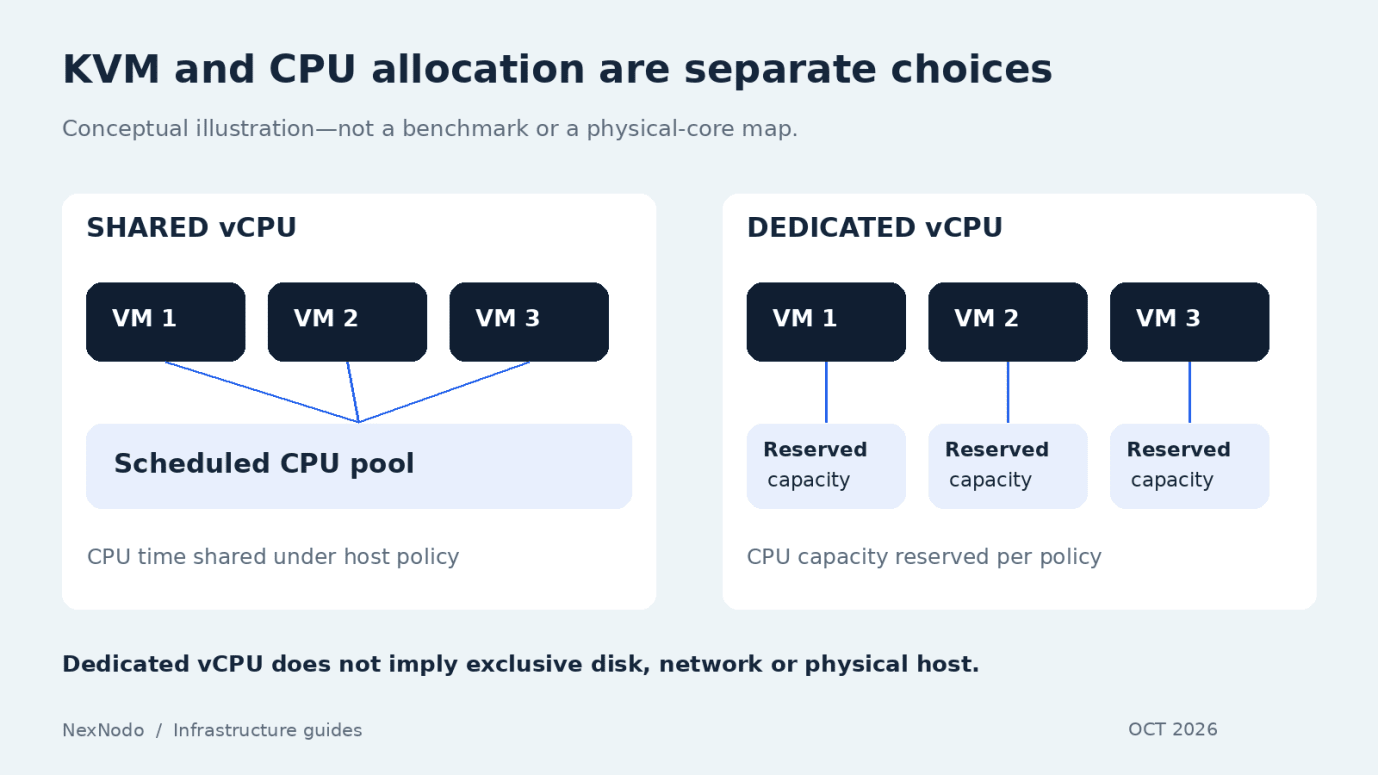
Virtualization and resource allocation are separate choices. A KVM host can schedule CPU time among several customers, or a provider can reserve CPU resources for a particular VM.
| Question | Shared vCPU | Dedicated vCPU |
|---|---|---|
| How is CPU capacity allocated? | CPU time is shared across VMs under the provider’s scheduling policy | CPU capacity is reserved according to the product’s allocation policy |
| What is the main trade-off? | Lower-cost capacity may have more variable availability under contention | More predictable CPU access usually carries a higher price |
| What workloads should evaluate it? | Bursty services, development and lightly loaded applications | Sustained compute or workloads sensitive to CPU scheduling delays |
| Is the whole physical server exclusive? | Usually no | Usually no; dedicated vCPU is not a dedicated physical server |
| Is application performance guaranteed? | No | No; other bottlenecks still matter |
The meaning of a vCPU is product-specific. It may map to a hardware thread rather than an entire physical core. Ask how CPU reservation and simultaneous multithreading are handled if that distinction matters to your workload.
For a concrete example, Hetzner’s server documentation covers both shared-resource plans and dedicated-resource cloud instances. The distinction comes from the selected plan, not simply from using a virtual machine.
Will two dedicated vCPUs beat four shared vCPUs?
Not necessarily. The result depends on processor generation, available CPU time, workload parallelism and other resource limits.
A shared plan with four vCPUs may perform well when spare host capacity is available. A two-vCPU dedicated plan may produce more consistent completion times under sustained contention. Neither outcome can be inferred from the advertised core count alone.
For a build runner, measure the time and cost of completing the same build repeatedly. For a web service, measure response-time percentiles and error rates at a fixed request rate. For a game server, test simulation or tick behavior with a representative player workload.
Compare outcomes that users or operators care about, rather than trying to turn different vCPU specifications into an assumed performance score.
What else affects VPS performance?
CPU architecture and workload compatibility
Check whether the instance uses x86 or Arm, and whether your packages, container images and proprietary binaries support it. A compatible architecture is essential; processor frequency alone does not capture per-core performance.
Memory pressure
An application that runs out of RAM may slow down, swap heavily or have processes terminated. Monitor its working set and peaks. More CPU will not fix a database that lacks enough memory for its workload.
Storage latency and limits
NVMe is a storage interface used by SSDs; “SSD versus NVMe” usually means SATA/SAS SSD versus NVMe SSD in hosting descriptions. The label alone does not guarantee application performance.
Ask whether the disk is local or network-backed, whether IOPS or throughput are limited, and how storage failures are handled. Database response time can depend heavily on write latency, especially when durable writes are required.
Network behavior
Port speed and transfer allowance measure different things. A 1 Gbps port describes a rate; a monthly allowance in TB describes a quantity of data. Neither guarantees that every internet destination can sustain the maximum rate.
Test from relevant user locations and between tightly coupled services. A geographically closer server can still take a less efficient network route.
How to test a KVM VPS before committing
Use a disposable test environment and stay within the provider’s acceptable-use rules. Avoid destructive storage tests on production data.
| Test | What to record | What it helps reveal |
|---|---|---|
| Representative application load | p50/p95/p99 response time, throughput and errors | User-facing behavior at expected demand |
| Sustained CPU task | Completion time across repeated runs | Consistency and workload capacity |
| Memory observation | Peak usage, swapping and process failures | Whether the VM is undersized |
| Storage workload | Latency and throughput at realistic concurrency | Disk bottlenecks for your access pattern |
| Network checks | Latency, loss and useful transfer rate | Routing and connectivity limitations |
| Recovery exercise | Successful restore and time to recover | Whether the backup process works |
Repeat at more than one time of day and include background jobs. A short benchmark can miss contention or resource limits that appear only after sustained activity.
Keep the test conditions comparable: software versions, dataset, architecture, concurrency and cache state. If those change, you may be measuring the setup rather than the infrastructure.
What should KVM VPS hosting cost?
There is no standard KVM price. The bill reflects the allocated resources, location, billing period and included services.
For a useful quote, specify the CPU allocation — not just “2 vCPU” — alongside RAM, disk, IPv4, expected outbound traffic and backups. A dedicated-CPU request should be compared with other dedicated-CPU offers.
Also ask when billing stops. Hetzner, for example, continues charging for a cloud server until it is deleted; switching it off does not remove the reserved resources. Its cloud billing uses hourly charges up to the monthly cap.
Do not assume that rule applies everywhere. Scaleway documents a different power-off policy for instance compute, while attached storage and reserved flexible IPv4 addresses can continue to incur charges.
Deleting a VM can also leave separately billable resources behind. Review the remaining disks, backups and IP addresses before treating the environment as fully decommissioned.
Where can you compare European KVM VPS offers?
Contabo explicitly identifies Cloud VPS as KVM-based and shared-vCPU infrastructure. NexNodo’s marketplace describes KVM VPS offers, including dedicated-vCPU configurations from its available infrastructure. Confirm the specifications for the selected offer rather than assuming the entire marketplace uses one identical resource model.
For a broader buying shortlist, use our European VPS provider comparison. That comparison includes several compute platforms; it should not be read as a claim that every product from every provider uses KVM.
KVM VPS, containers or a dedicated server?
A VM has its own guest kernel. Ordinary containers share the kernel of the system running them. You can combine the two: a Linux KVM VPS can host Docker containers, which then share that VM’s guest kernel.
Containers package and isolate application processes; they do not replace the need to choose suitable underlying compute. A dedicated physical server gives you exclusive use of the machine, but also changes capacity planning, provisioning and recovery considerations.
Choose based on the level of control and capacity you need. A small application rarely needs a whole physical server simply because predictable performance matters.
Frequently asked questions
Is KVM suitable for production?
It can be. Production suitability depends on the complete service: resource allocation, maintenance, monitoring, backup and recovery design. The virtualization technology is one component.
Can I run Docker on a KVM VPS?
Usually, if you have an appropriate Linux guest, administrative access and provider permission. Running Docker inside the guest does not normally require nested virtualization.
Does dedicated vCPU mean dedicated RAM, disk and networking too?
No. It describes CPU allocation. Verify the memory policy, disk performance and network guarantees separately.
Is every European location in the EU?
No. Select the actual deployment country required for your workload. A broad European location label is not a substitute for checking the destination.
Compare the resource policy before the price
A good KVM VPS choice starts with three questions: what workload must it run, what performance must it sustain, and what will the complete configuration cost?
Search available VPS infrastructure on NexNodo, then check CPU allocation, storage, network limits and billing terms for the offer you intend to deploy.
Source Notes
The article was fact-checked against current provider material on October 8, 2026:
- KVM project: linux-kvm.org
- Hetzner server FAQ: docs.hetzner.com/cloud/servers/faq
- Hetzner billing FAQ: docs.hetzner.com/cloud/billing/faq
- Scaleway instance pricing: scaleway.com/en/docs/instances
- Contabo Cloud VPS documentation: docs.contabo.com
- Docker container concepts: docs.docker.com
- NexNodo marketplace: nexnodo.com/marketplace
- NexNodo search: nexnodo.com/search