The Real Cost of Running a Small SaaS in 2026
A server price is easy to compare. The cost of keeping a SaaS product available, recoverable and maintainable takes more work.
For a small team, the cheapest sensible architecture is often the one it can operate confidently. That might be a single VPS. It might be separate application and database servers. Kubernetes becomes attractive when its deployment and orchestration capabilities solve a recurring problem worth paying for.
This guide builds a monthly budget for all three approaches. The numbers are illustrative planning assumptions in USD, not live provider prices, NexNodo offers or measured performance results. Replace them with quotes and measurements for your workload before making a purchase.
What recent research changes about the conversation
The State of FinOps 2026 report includes 1,192 respondents representing more than $83 billion in annual cloud spending. It identifies pre-deployment architecture costing as a desired capability: estimating the financial consequences of a design before committing to it.
That research describes the FinOps community, not a representative sample of tiny SaaS companies. The useful lesson for a small team is nevertheless practical: write the operating budget while choosing the architecture, rather than after receiving the first invoice.
Start with a workload, not a server size
Imagine a B2B application with a web frontend, an API, PostgreSQL, a background worker and uploaded documents. Its customers are mainly in Europe. Traffic is modest but uneven, and imports occasionally create short CPU and database spikes.
We deliberately do not assign a user-count capacity to a particular VPS. Ten customers importing large datasets can generate more load than thousands reading cached pages. Before selecting resources, capture peak request rate, database size and growth, worker concurrency, memory use, and acceptable response time.
Also define two recovery targets. Recovery point objective (RPO) is the amount of recent data you can afford to lose. Recovery time objective (RTO) is how long restoration can take. A daily backup will not meet a five-minute RPO on its own. A backup that takes six hours to restore will not satisfy a one-hour RTO.
Three architectures and their monthly budgets
These scenarios illustrate increasing separation and operational scope. They are not equivalent performance or availability configurations.
| Monthly cost assumption | A: Single VPS | B: Separate app + database | C: Small Kubernetes deployment |
|---|---|---|---|
| Compute | $24 | $48 | $90 |
| Persistent storage beyond compute allowance | $0 | $10 | $20 |
| Off-server backup allowance | $8 | $12 | $15 |
| Traffic allowance / overage provision | $5 | $8 | $10 |
| Monitoring and log retention | $5 | $10 | $15 |
| Load balancer / control-plane allowance | $0 | $0 | $25 |
| Infrastructure subtotal | $42 | $88 | $175 |
| Operations time assumption | 2 hours | 3 hours | 5 hours |
| Operations at $50/hour | $100 | $150 | $250 |
| Monthly economic cost | $142 | $238 | $425 |
Scenario A places the app, worker and database on one machine. Scenario B uses two $24 compute instances and a private app-to-database connection. Scenario C assumes three $30 worker nodes and runs the database inside the cluster, with persistent storage budgeted separately. It does not include an external managed database or imply a replicated database setup. The $25 line is a combined planning allowance, not a claim that every managed service charges for its control plane.
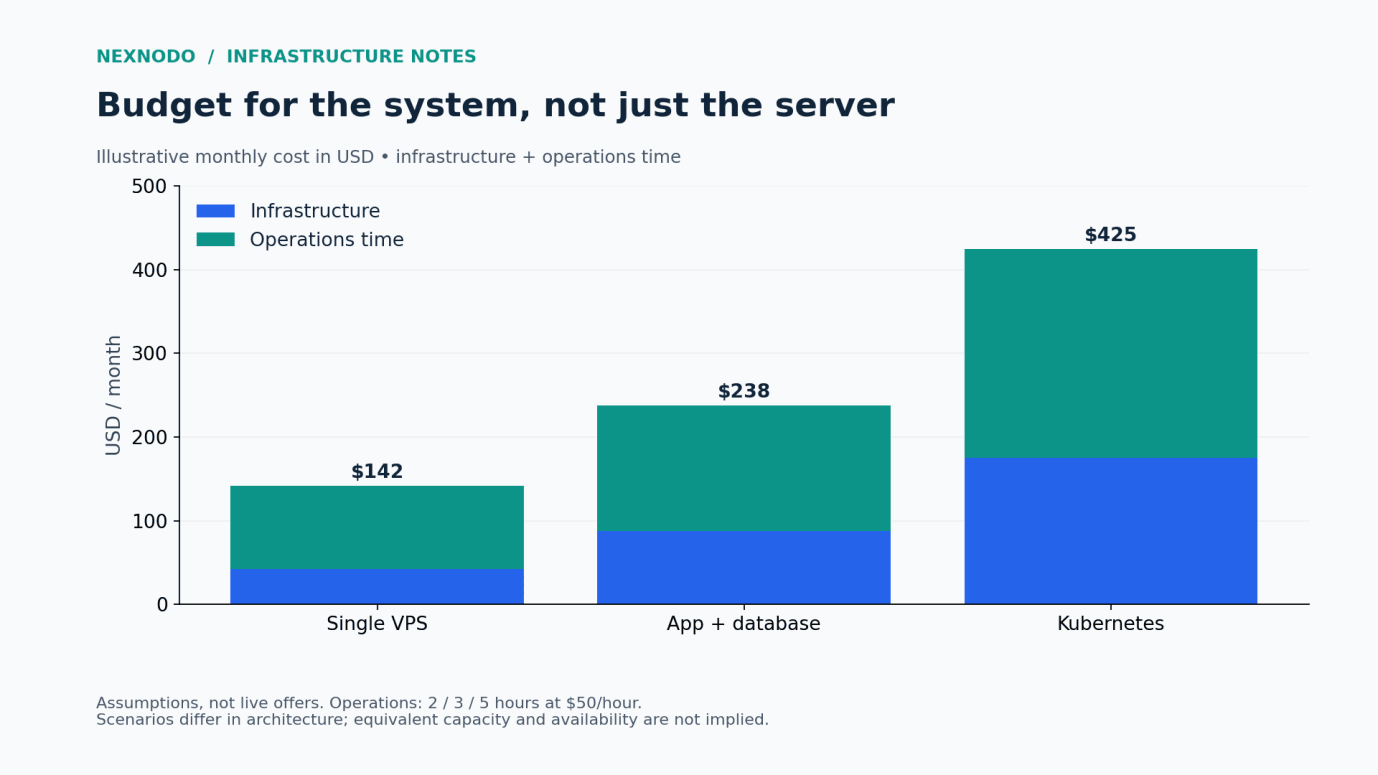
The time allocations are assumptions, not evidence that Kubernetes always needs more work. An experienced platform team with established automation may operate a cluster efficiently. A team learning it during production incidents may spend substantially more.
The model excludes tax, payment processing, email delivery, domains, third-party application subscriptions, staging, migration work and expected outage losses. Add each applicable item. Operations time is an economic cost; it is not necessarily an additional cash invoice if it comes from existing staff.
What each architecture buys you
A single VPS buys simplicity. There is one host to patch and inspect, and fewer network boundaries to troubleshoot. Its main compromise is concentrated failure: an unavailable host can take down the entire application. Off-server backups protect recoverability, but do not keep the application running during a host failure.
Separate app and database servers buy isolation. You can resize the database independently and keep its data away from application deployments. They do not automatically buy high availability: one app server and one database server remain single points of failure. This design can also introduce inter-server latency and transfer costs.
Kubernetes buys an orchestration model. It can be useful when several services need independent releases, scheduling and repeatable deployment configuration. Three workers alone do not make the full system resilient. The database, persistent volumes, ingress path, control plane and failure-domain placement all need deliberate design. A three-node cluster in one failure domain can still fail together.
Find the cost that changes your decision
Using the assumed $50 hourly rate, every extra hour spent maintaining infrastructure adds $50 to the economic budget. That is larger than the entire $42 infrastructure subtotal in scenario A.
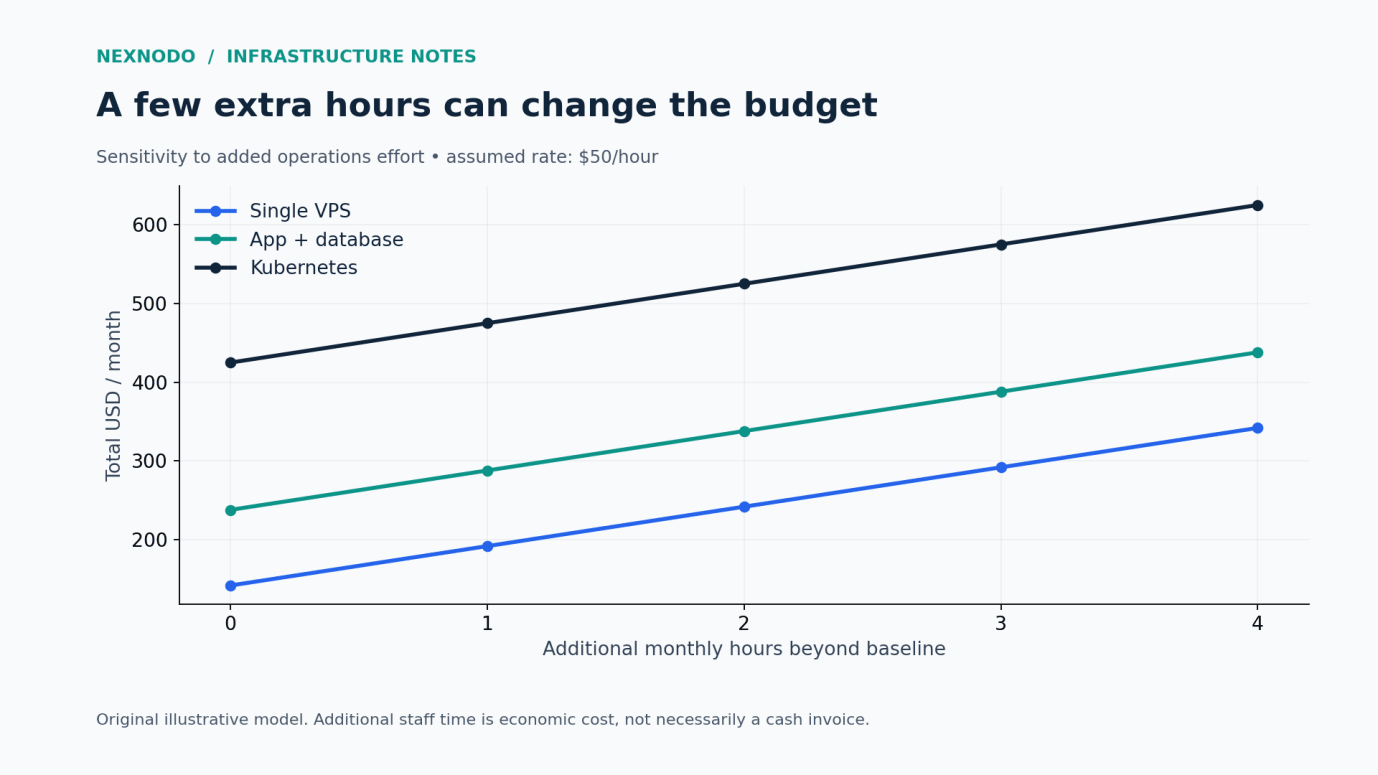
This does not mean that an expensive managed service is always better. It means the comparison needs both sides: the recurring fee and the work it actually removes. Ask who handles upgrades, backups, restore testing, incident response and database tuning. “Managed” is only useful when the responsibility boundary is clear.
A practical buying checklist
Before deploying, record the following in one short worksheet:
- Compute: shared or dedicated CPU, memory, expected peak load and the result of a representative load test.
- Storage: usable capacity, growth, performance requirements, snapshot billing and restore procedure.
- Network: included transfer, overage rates, private networking and charges between locations.
- Recovery: backup destination, retention, encryption and the last successful restore exercise.
- Operations: a named owner, monthly effort allowance, patching plan and alerts that require action.
For compute selection, our shared versus dedicated vCPU guide explains why matching CPU counts is not enough.
A decision you can revisit
Choose the least complex architecture that meets your measured workload and recovery targets. Then write down the trigger for changing it: sustained memory pressure, database contention, a deployment bottleneck or a recovery requirement the current design cannot satisfy.
Review the budget after a full billing cycle. Replace assumptions with observed costs and staff time. Track cost per paying customer alongside total spend, while watching whether reliability or support workload deteriorates.
A growing infrastructure bill can be healthy if the business grows faster. A low bill can be misleading if it depends on repeated manual recovery. The purpose of the budget is to make that trade-off visible.
Next step: Explore infrastructure on NexNodo and compare candidate configurations using the same worksheet. If your main uncertainty is orchestration, read Do You Really Need Kubernetes?
Sources and methodology
- FinOps Foundation — State of FinOps 2026: research context only; not the source of the scenario prices.
- All prices, hours and totals in the charts are an original illustrative budgeting model. Arithmetic: infrastructure subtotal + operations hours × $50. No performance tests were conducted for this article.
- Research checked on 22 October 2026. Provider quotes should be checked at purchase time.